
Direct Answer This section highlights the main takeaway of this page.
Easy DataLayer Manager is a WordPress plugin that automatically establishes a clean, well-defined dataLayer — the data foundation that Google Tag Manager, analytics platforms, and AI-driven workflows depend on to function reliably.
Key points
- Auto-detects and pushes standard dataLayer events with zero configuration
- Built-in WooCommerce support out of the box
- Pro tier adds per-page custom variable support
- Works with Google Tag Manager, GA4, and third-party analytics tools
Sources
v.1.0 | WORDPRESS.ORG APPROVED
Your analytics tools are guessing. Stop letting them.
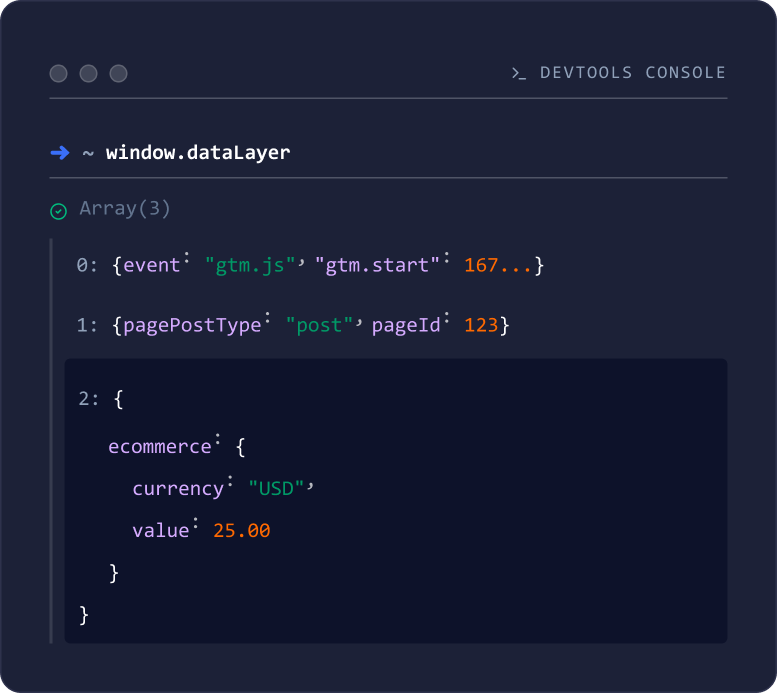
Easy DataLayer Manager automatically builds and injects a structured window.dataLayer on every page. No manual coding. No GTM workarounds. No dev backlog.
- Zero-configuration auto detection
- Built-in WooCommerce support
- Optional per-page custom variables (Pro)
Download DataLayer Manager
Enter your email to receive the download link.
Free to use. Pro adds per-page custom controls.
01 — KEY BENEFITS

Consistent data, on every page.
Detects WordPress page context automatically and outputs a structured dataLayer on every load. Set it and forget it.

WooCommerce-ready out of the box.
Includes product, cart, and checkout context the moment WooCommerce is active. No extra configuration required.

Extend it your way.
Pro lets you add custom variables per page, post, or product directly from the admin – no code required.
02 — DATA LAYER
Rich data context, automatically injected.
Easy DataLayer Manager reads WordPress context and injects it into window.dataLayer using the standard dataLayer.push() pattern – ready for GTM, GA4, and any analytics or automation tool that knows how to listen.
Included Variables
- Page type and template context
- Post/page IDs and titles
- Categories and tags
- Logged-in state
- Site metadata
- WooCommerce: product, cart, and checkout data (when active)
03 — PRICING
Start free. Add control when you need it.
FREE
- Automatic detection + injection
- Works immediately after activation
- WooCommerce support
- View output in the browser console
- Add custom data variables
Download DataLayer Manager
Enter your email to receive the download link.
Download from WordPress.org
$59
Everything in Free, plus:
- Add custom variables per page/post
- Admin UI for editing variables
- Preview detected variables
- Conflict protection for reserved keys
- Custom values override defaults
04 — INSTALLATION
Up and running in 60 seconds.
01
Download the ZIP file
02
WordPress Admin → Plugins → Add New →
Upload Plugin
03
Activate Easy DataLayer Manager
04
Visit any page and confirm window.dataLayer is present in the browser console
Think you can build this in an afternoon?
Here's the prompt. Paste it into any AI coding assistant and see how far you get. We'll be here when you want the version that's maintained, tested, and production-safe.
Copy this entire document and paste it into an AI coding assistant. The AI will create a WordPress plugin called Scripts + Pixels DataLayer Manager.
The plugin automatically populates a JavaScript dataLayer object on every front-end page. Analytics tools like Google Tag Manager (GTM) and Google Analytics 4 (GA4) use this object to receive context about the current page—e.g. page type, post ID, product data, cart totals—without manual configuration. The plugin detects WordPress context (home, post, page, category, archive, search, etc.) and, when WooCommerce is active, product, cart, and checkout data. It injects these variables into window.dataLayer using the standard push method so they are available to GTM and other scripts. No coding or setup is required. There is no licensing or premium features—just automatic detection and injection.
Get the Complete AI Prompt
Enter your details to receive the complete AI prompt.
05 — REQUIREMENTS
WordPress 5.0+
PHP 7.4+
Gutenberg editor enabled
06 — FAQS
Frequently Asked Questions
Yes. The plugin outputs a standard window.dataLayer – GTM and GA4 read it exactly as expected. No custom configuration required on the analytics side.
Without it, GTM and GA4 receive generic page signals with no context about what type of page is being viewed, what content is on it, or who is viewing it. A structured dataLayer gives your analytics and downstream systems accurate, consistent signals on every page load – including AI and LLM-powered services that rely on structured site context.
No. The plugin is lightweight and built to run with minimal overhead.
Nothing changes. Output is based on WordPress context, not theme code. Switching themes has no effect on the dataLayer.
Free tier: yes. Pro licensing depends on your selected plan.
Your dataLayer is one install away.
Download the free plugin or unlock Pro to add per-page custom variables.
Download DataLayer Manager
Enter your email to receive the download link.